Workout Log
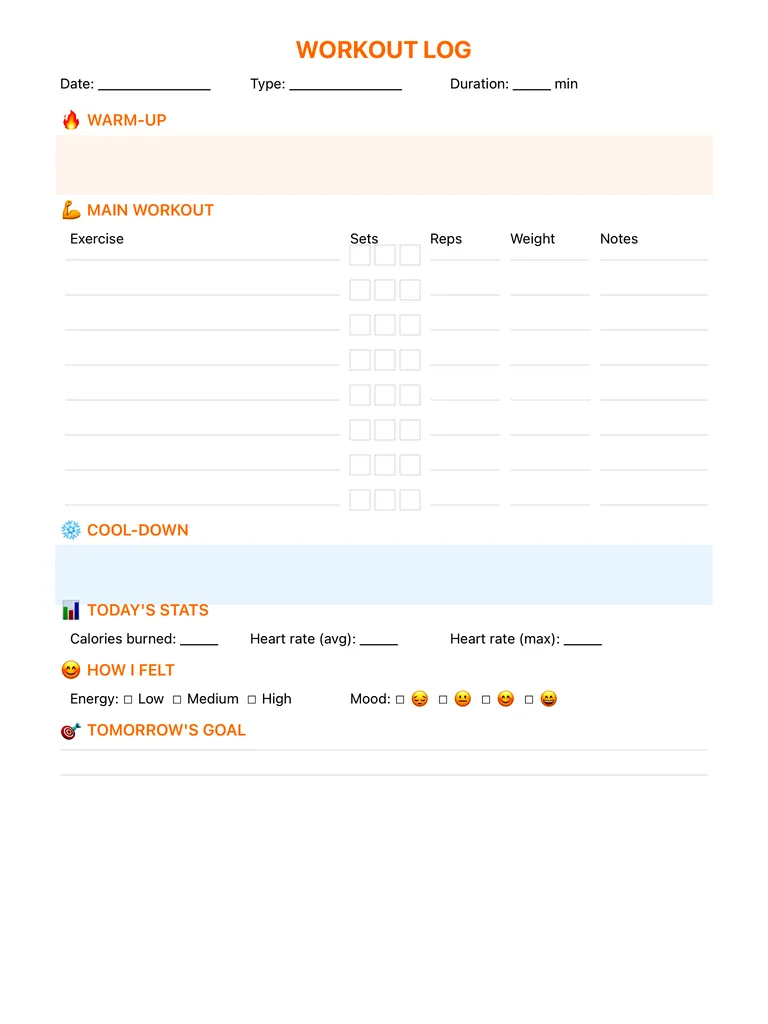
A workout log page with warm-up, a main workout table (exercise, sets, reps, weight, notes), cool-down, today's stats, how you felt and tomorrow's goal. Free printable PDF or digital for iPad.
Free · no sign-up · PDF works for printing and in PDF note apps such as Goodnotes and Notability. Premium template in the app.
About this template
Write the date, workout type and duration, then note your warm-up in the box at the top. The main workout table has eight exercise rows, each with three set boxes to tick, plus columns for reps, weight and notes. A cool-down box follows. Today's Stats has fields for calories burned and average and max heart rate, and How I Felt lets you mark energy (low, medium, high) and mood. Finish with one line for tomorrow's goal.
How to use it
- Write the weight you used, not the one you planned, so the next session starts from real numbers.
- Tick a set box as soon as you finish the set.
- Use the notes column for form cues or when something felt off.
- Look back over four weeks of logs before you raise the weight.
Who it's for
- Wellness Seekers: Balance mind, body & soul
- Journalers: Reflect & document life
Write with Apple Pencil, a mouse or your finger. Your page is saved in this browser.

Use the Workout Log in Planner for iPad
A fresh page every day, 132 templates, day/week/month/year views and reminders — made for Apple Pencil.
Frequently asked questions
What should a workout log include?
Exercises, sets, reps and weight at minimum. This page also covers warm-up, cool-down, heart rate, energy and mood.
Does it work for cardio?
Yes. Use the type and duration fields and the stats section, and use the exercise rows for intervals or distances.
Can I use it as a fitness planner?
Yes. Fill in the exercises before the session and log the numbers during it, then pair it with the habit tracker to track how often you train.