Quarterly Planner
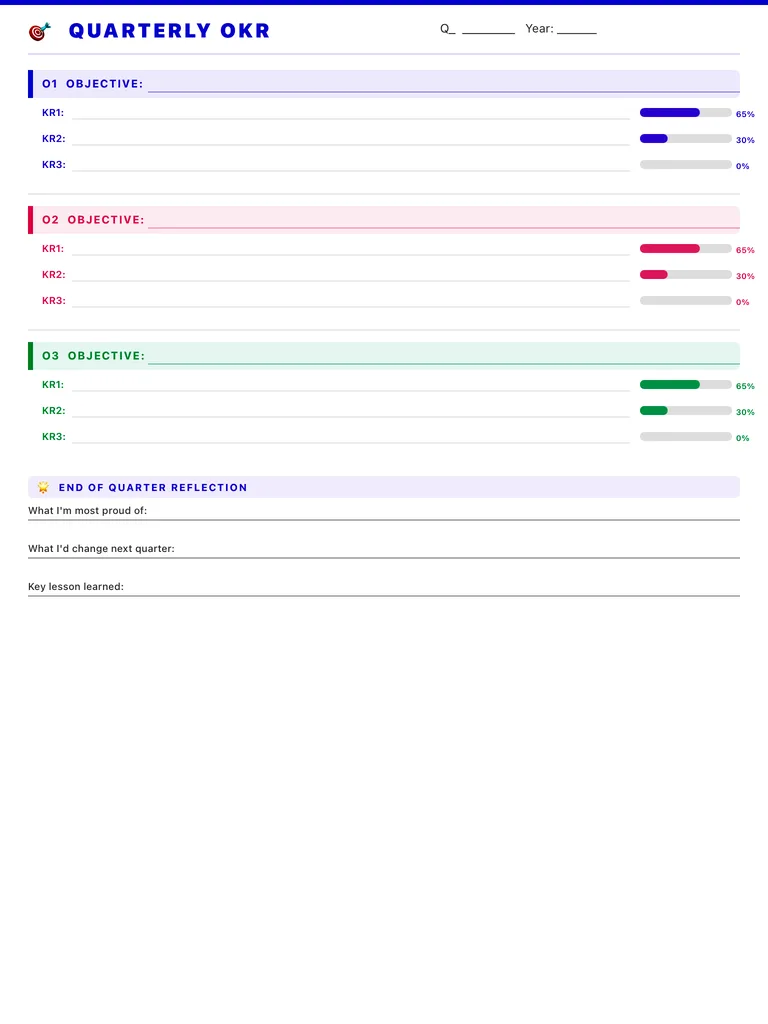
A quarterly planner built on OKRs: three objectives, three key results under each with a progress bar, and an end-of-quarter reflection. Free printable PDF or digital for iPad.
Free · no sign-up · PDF works for printing and in PDF note apps such as Goodnotes and Notability. Premium template in the app.
About this template
Fill in the quarter and year, then write up to three objectives, each in its own color. Under every objective are three key result lines with a progress bar on the right, so you can shade in how far along each one is. At the bottom, the end-of-quarter reflection asks what you're most proud of, what you'd change next quarter and the key lesson you learned. Three months is long enough for real progress and short enough to stay focused.
How to use it
- Write objectives as outcomes you care about; write key results as numbers you can check.
- Update the progress bars every week or two, not only at the end.
- Three objectives is the limit, not the target; one or two is fine.
- Do the reflection before you write next quarter's page.
Who it's for
- Professionals: Manage meetings & deadlines
- Entrepreneurs: Plan projects & track goals
- Goal Setters: Track progress & achievements
Write with Apple Pencil, a mouse or your finger. Your page is saved in this browser.

Use the Quarterly Planner in Planner for iPad
A fresh page every day, 132 templates, day/week/month/year views and reminders — made for Apple Pencil.
Frequently asked questions
What is an OKR?
Objectives and Key Results: an objective is what you want to achieve, and key results are the measurable signs that you got there.
Can I use it for personal goals?
Yes. It works for fitness, savings, learning or side projects as well as for work.
How does it fit with a yearly plan?
Use the 2027 digital planner for the year, and one OKR page per quarter to break it down.