Lesson Plan Template
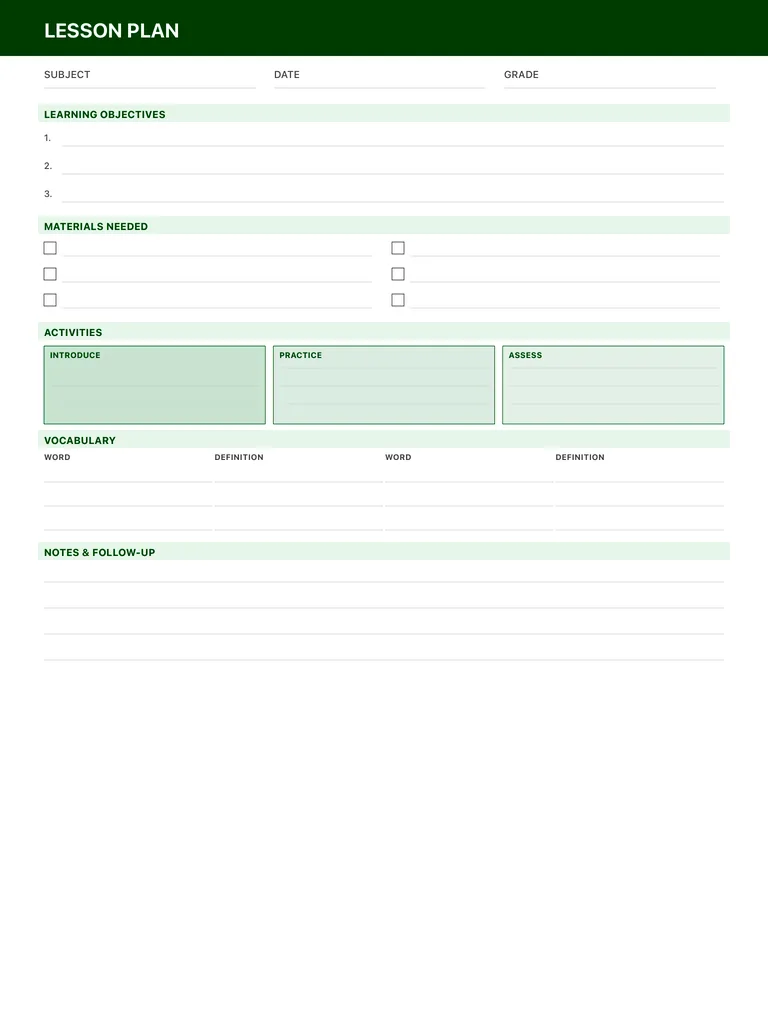
A one-lesson plan template for teachers and homeschool parents: subject, date and grade, three learning objectives, materials, an introduce-practice-assess activity flow, vocabulary and follow-up notes. Free PDF or digital.
Free · no sign-up · PDF works for printing and in PDF note apps such as Goodnotes and Notability. Premium template in the app.
About this template
Start with the subject, date and grade, then write up to three learning objectives. The materials section has six checkbox lines so you can gather everything before class. Activities are split into three boxes (introduce, practice and assess), which keeps each lesson moving from explanation to independent work to a check for understanding. The vocabulary table pairs words with definitions, and the notes and follow-up lines are for what worked and what to revisit next time.
How to use it
- Write objectives as what students will be able to do, not what you'll cover.
- Decide how you'll assess before you plan the practice activity.
- Tick materials off the night before.
- Fill in the follow-up notes right after the lesson, while it's fresh.
Who it's for
- Students: Track classes, assignments & exams
Write with Apple Pencil, a mouse or your finger. Your page is saved in this browser.
Use the Lesson Plan Template in Planner for iPad
A fresh page every day, 132 templates, day/week/month/year views and reminders — made for Apple Pencil.
Frequently asked questions
Is this a daily or weekly lesson plan template?
Each page plans one lesson. For a week of subjects at a glance, use the homeschool planner alongside it.
Does it work for homeschool?
Yes. The layout suits classroom teachers and homeschool parents alike, for any subject and grade.
Can I reuse a lesson plan?
Yes. In the app you can duplicate a page, edit it with Apple Pencil, and export it as a PDF.