Medication Log
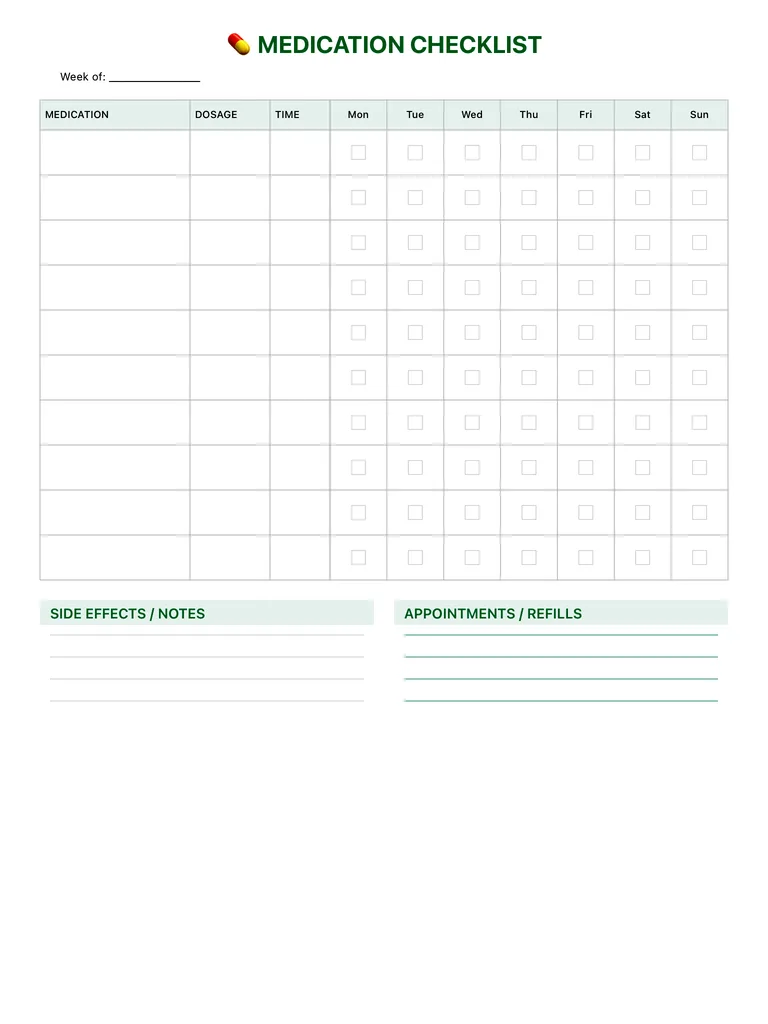
A weekly medication log with columns for medication, dosage and time, a checkbox for each day from Monday to Sunday, and sections for side effects and appointments or refills. Free PDF or digital.
Free · no sign-up · PDF works for printing and in PDF note apps such as Goodnotes and Notability. Premium template in the app.
About this template
Write the week at the top, then list each medication or supplement on its own row with the dosage and the time you take it. Seven checkboxes, Monday to Sunday, let you mark each dose as taken, so you can see at a glance whether you've missed one. Below the table, Side Effects / Notes is for anything you notice, and Appointments / Refills keeps doctor visits and refill dates in one place. This is a personal tracking aid, not medical advice; always follow the instructions from your doctor or pharmacist.
How to use it
- Use one row per dose time; a medicine taken twice a day gets two rows.
- Check the box right after you take it, not later from memory.
- Write refill dates a few days before you'll run out.
- Bring the page to appointments; it answers most questions about what you're taking.
Who it's for
- Wellness Seekers: Balance mind, body & soul
- Busy Parents: Organize family schedules
- Elderly Care: Manage complex medication schedules
Write with Apple Pencil, a mouse or your finger. Your page is saved in this browser.
Use the Medication Log in Planner for iPad
A fresh page every day, 132 templates, day/week/month/year views and reminders — made for Apple Pencil.
Frequently asked questions
Is this medical advice?
No. It's a personal tracking aid for your own records. Your doctor or pharmacist decides doses and schedules.
Can I use it for a family member?
Yes. Many caregivers keep one page per person per week.
Can I share it with my doctor?
Yes. Export it as a PDF from the app or print it and bring it to your appointment.